Amazon Certificate of Insurance: Sample and Checklist
Amazon judges your coverage by a single page: the certificate of insurance. Here is a marked-up sample, the six details Amazon reads and the steps to upload it without a rejection.
What the certificate does for Amazon
A certificate of insurance is a one-page summary of a policy, usually on the ACORD 25 form, issued by the agency or insurer that placed the coverage. Amazon never sees your full policy unless it asks. It reads the certificate, compares it with the requirements and either accepts the upload or sends back a reason. Our general certificate of insurance guide covers how certificates work for landlords and clients.
The page itself changes nothing about your coverage. It reports what the policy and its endorsements already say. If the endorsement naming Amazon is missing from the policy, no amount of editing on the certificate fixes that, and the right step is to have the endorsement added and a fresh certificate issued.
A sample Amazon certificate
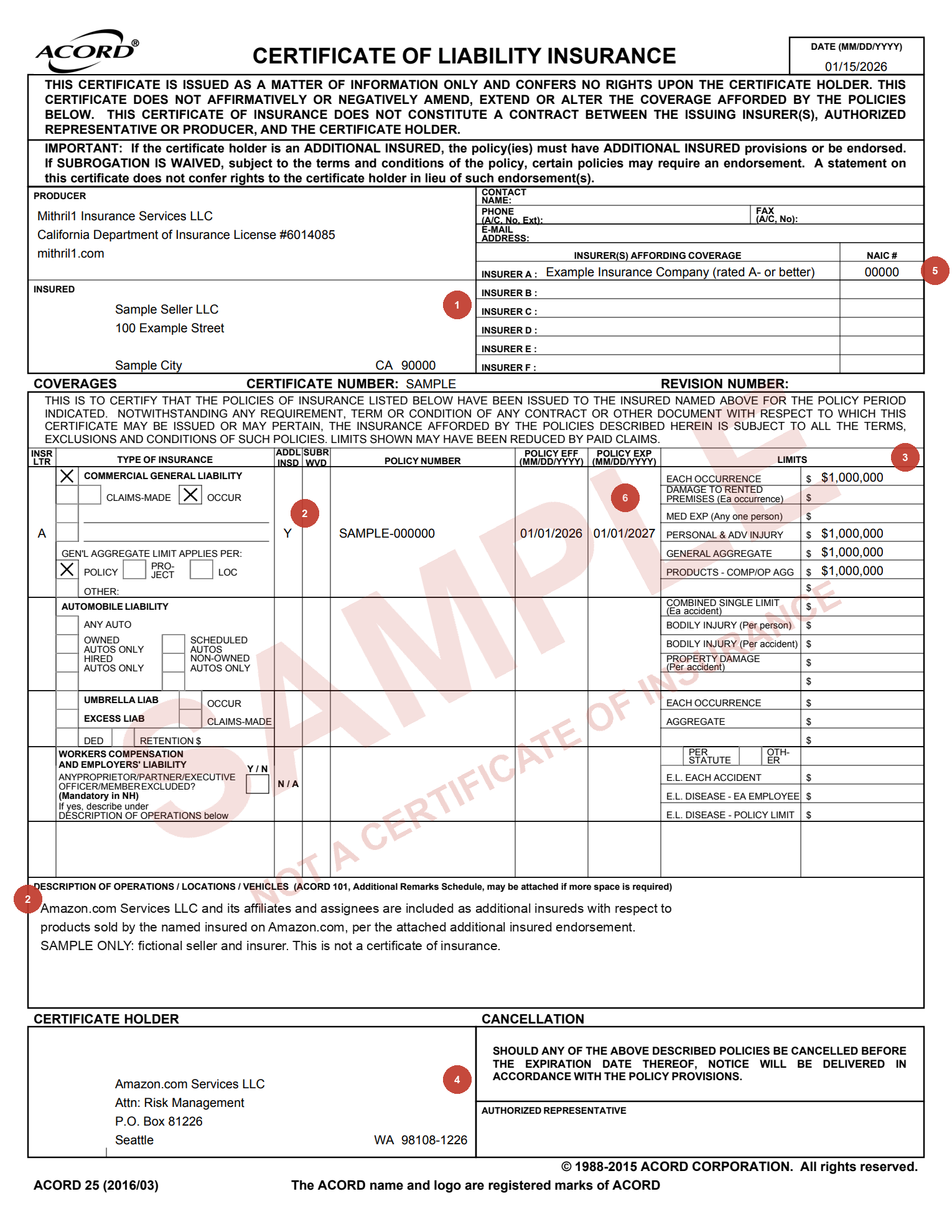
We prepared the sample below on the standard ACORD 25 form for a fictional seller, Sample Seller LLC. It is marked SAMPLE and is not a certificate of insurance. The numbered markers match the six checks Amazon makes, explained in the next two sections.
Download the sample certificate (PDF)
Your own certificate will carry your insurer, policy number and dates, but the boxes sit in the same places. Hold yours next to the sample and work through the numbers in order before you upload.
Reading the sample, markers 1 to 3
1. Your legal name. The name in the Insured box has to match the legal business name on the seller account exactly, down to the punctuation. “Sample Seller LLC” and “Sample Seller, L.L.C.” read as two different companies to a reviewer. A single-member LLC may use its trade name, so long as Seller Central shows the same one.
2. Amazon as additional insured, by endorsement. The ADDL INSD column reads Y on the liability line, and the Description of Operations box repeats Amazon’s wording: Amazon.com Services LLC and its affiliates and assignees, per the attached endorsement. Both pieces matter. The Y tells the reviewer an endorsement exists, and the description shows it names the right Amazon entity.
3. Limits and products coverage. Each occurrence and the general aggregate both show $1,000,000, the occurrence box is checked, and products-completed operations is included with its own aggregate. A certificate that shows premises coverage without the products line invites a question, because the products you ship are the exposure Amazon cares about.
Markers 4 to 6: holder, insurer and dates
4. Certificate holder. The sample lists Amazon.com Services LLC, Attn: Risk Management, P.O. Box 81226, Seattle, WA 98108-1226. That P.O. box is the Risk Management address in Amazon’s selling agreement. Keep the full ZIP+4 and avoid swapping in a street address copied from an older certificate.
5. Insurer rating. The insurer in the Insurer A line needs a financial strength rating of A- or better from AM Best or S&P. Ask the agency for the rating if you do not know it, and enter the insurer’s name in Seller Central exactly as it appears in that box, not the producer’s name at the top left.
6. Dates and the deductible line. The policy must be in force on the day you upload, so a start date in the future draws a rejection, and the expiration date sets your renewal deadline. The sample shows the deductible line because Amazon wants any deductible listed. The deductible rule itself has changed over time, so check the current figure on the Amazon seller insurance requirements page and in Seller Central.
Why certificates come back rejected
We work with hundreds of Amazon sellers, and the certificate issue we see most is Amazon listed only as certificate holder. Amazon’s reply in those cases is consistent: it must be named as additional insured. Close behind come legal names that differ by a comma or a DBA, an insurer name typed into Seller Central that does not match the certificate, and limits split across two policies so neither shows $1,000,000 on its own.
Other rejections trace back to the policy rather than the page. A claims-made form outside the categories Amazon allows, a policy that starts after the upload date, or a certificate missing a signature all send the file back. Renewals catch sellers out too: re-uploading last year’s certificate with only the dates changed does not cure a problem the reviewer flagged before. When a rejection arrives, our page on Amazon insurance flags and rejections walks through each fix.
Uploading the certificate in Seller Central
- Sign in to Seller Central with the account the certificate names.
- Open Settings, choose Account Info, then Business Insurance.
- Enter the insurer name, the insured name, the policy number and the policy dates exactly as the certificate shows them.
- Attach the certificate as a .pdf, .doc or .docx file, and convert a scan or photo to PDF first.
- Check every field against the file once more, then submit.
Amazon emails a reminder 30 days before the certificate expires. Upload the renewal as soon as the new certificate arrives rather than waiting for that email, and save the confirmation screen with the date you submitted.
Requesting an Amazon certificate from us
When we issue an Amazon certificate, we start from your Seller Central details: the legal entity name, the business address on the account and the deadline in Amazon’s notice. Tell us if you sell in an enhanced safety category, since from November 2, 2026 those products need the policy regardless of sales, and tell us about every marketplace you use.
If another agency holds your policy, the same checklist still helps. Send it the six markers above and ask for a certificate and endorsement page that match them. More guides for sellers sit on our Amazon seller insurance hub.
A few useful answers
Common questions
Can I edit my Amazon certificate of insurance myself?
No. The certificate has to come from the agency or insurer that placed the policy. Ask the issuer for a corrected certificate, and for an added endorsement when the change involves Amazon’s status.
Is being certificate holder the same as being additional insured?
No. The certificate holder only receives the certificate, while additional insured status comes from an endorsement on the policy. Amazon asks for both, and the endorsement is the part that gives Amazon protection.
What address goes on an Amazon certificate?
Amazon.com Services LLC, Attn: Risk Management, P.O. Box 81226, Seattle, WA 98108-1226, the Risk Management address in Amazon’s selling agreement. Keep the full ZIP+4.
How long does Amazon take to review a certificate?
Sellers usually hear back within several business days of a digital upload. Review by mail takes far longer, which is why the upload in Seller Central is the route to use.
Does Amazon need my full policy as well as the certificate?
Amazon reviews the certificate first. Keep the policy and the additional insured endorsement ready, because a reviewer who questions the certificate often asks to see the endorsement page.